You’ve probably scrolled past a photo lately that just felt… off. Maybe the fingers looked slightly wrong, or the background blurred in a way that didn’t match the foreground. Before you hit share, that little hesitation creeps in—and honestly, that pause is your best defense. Learning to spot AI generated image mistakes, especially with hands, text, and subtle visual glitches, is simpler than you think. You don’t need fancy software or a tech degree. Just a quick mental checklist and a trained eye. If you’re also worried about spotting deepfake media on your phone, the same careful habits apply.
Why Synthetic Photos Still Give Themselves Away
These generators get sharper every month, but they still trip over the basics. AI models learn by stitching together millions of real photos. They don’t actually understand anatomy, gravity, or how light bounces off glass. They’re just predicting which pixels should sit next to each other.
That guessing game leaves cracks in the final image. When you slow down and look closely, the same patterns pop up across almost every fake. Once you know where to focus, it becomes almost automatic.
The Visual Clues That Actually Matter
Here’s what trips up the models. I’m breaking down the most common AI image artifacts to look for, starting with the dead giveaways.
Hands & Fingers
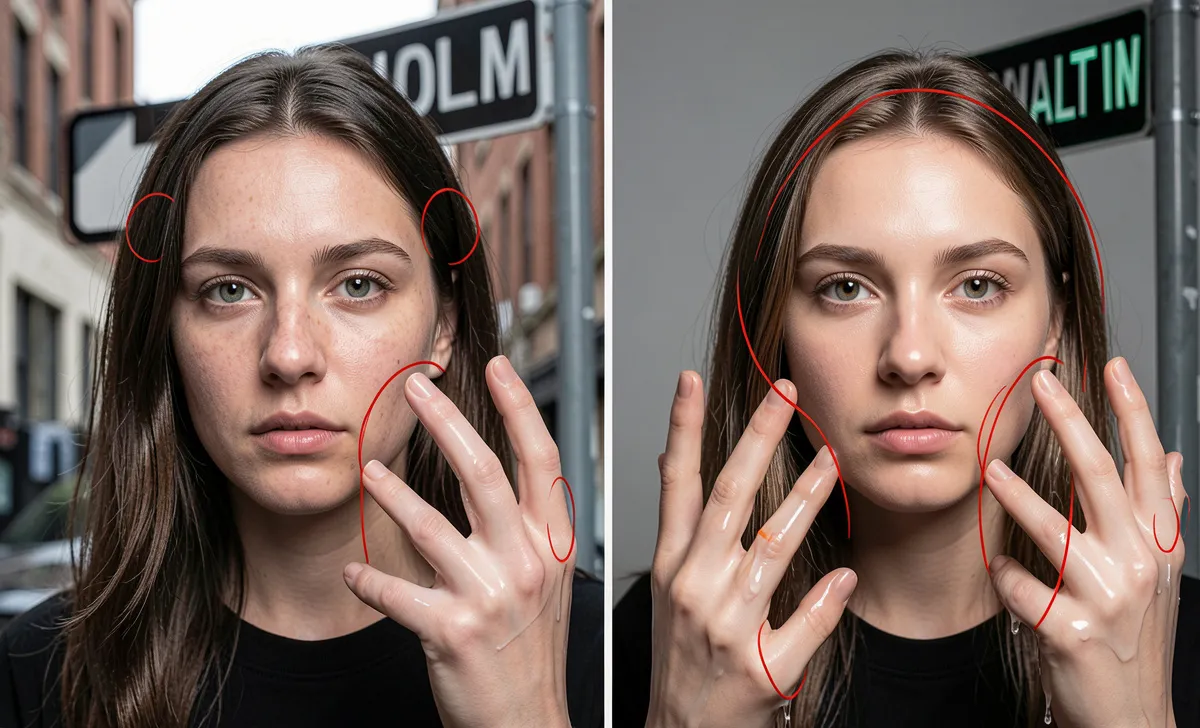
Ask any traditional illustrator. Hands are notoriously difficult to draw, and AI models struggle with the same geometry. You’ll frequently see six fingers, thumbs blending into knuckles, or joints bending backward. If someone is gripping an object, watch where it touches the skin. It usually melts into a smooth, unnatural blob.
Text & Logos
Older generators couldn’t spell at all. Newer ones can, but they still miss the fine details. Look for warped letters, backward punctuation, or complete gibberish on street signs, book covers, and shirts. Real lenses capture crisp edges. AI tends to smudge or stretch anything with sharp typography.
Eyes & Symmetry
Pupils might not match in size or point in slightly different directions. One eye can look glassy, reflecting a window that isn’t actually in the frame. Real faces have subtle asymmetry. If both sides look eerily identical, pause for a second.
Hair & Texture
Real hair has individual strands, flyaways, and natural clumping. AI hair often looks painted, overly glossy, or dissolves into the background. Pay attention to the edges near the ears and shoulders. They rarely transition cleanly.
Backgrounds & Perspective
Depth is a major weakness. Backgrounds often smear into dreamy washes, or architectural lines bend in ways that violate basic geometry. Check railings, windows, or door frames. If they curve randomly or vanish into space, you’re likely looking at a generated scene.
Teeth & Mouths
Too many teeth, misaligned rows, or a smile that doesn’t quite follow the jawline. AI models treat teeth like a repeating pattern rather than separate pieces. Check the gum line too. It usually looks waxy or completely smooth.
Lighting & Shadows
This is where physics comes in. Light has to come from a source. In synthetic photos, shadows often point in conflicting directions, or highlights appear on faces with zero visible light source. Skin might look lit like a studio portrait while the background suggests harsh midday sun. That mismatch is a massive red flag.
Skin & Fabric Details
Over-polished skin is a classic tell. Real skin has pores, fine lines, and natural texture variations. AI tends to buff everything down to a porcelain finish. Clothing folds follow the same rule. They’ll either look unnaturally stiff or draped without logical creases.
A Quick Verification Routine Before You Share
Seeing those visual clues covers step one. But what if the image looks clean? Here’s a simple workflow to fact-check AI images on social media without burning ten minutes.
Drop it into Google Lens or TinEye first. If it pulls up zero matches from verified news outlets or stock databases, that’s suspicious. Next, check the metadata if the platform allows it. Original files sometimes carry generator tags like “Midjourney” or “DALL-E,” though most sites strip this out automatically.
When you’re trying to spot deepfake images before sharing, context usually beats pixels. Who posted it? Does the caption link to a verifiable event, or is it vague engagement bait? If a photo defies basic physics but aligns perfectly with a sensational headline, treat it like an unconfirmed rumor. A three-second pause saves a lot of embarrassment later. And if you’re ever unsure about AI scam warnings in other formats, the same skepticism applies.
What Real Users & Fact-Checkers Are Saying
If you’re wondering how to tell if a photo is AI-generated, Reddit threads will give you a solid reality check. Communities like r/DeepFakes and r/Artificial break down viral images daily. Their consensus is pretty consistent: trust your instinct, then verify.
Most active users agree that zooming in to 100% is the fastest way to catch errors. A lot of viral “leaks” fall apart the second you inspect background crowds or distant signage. Professional fact-checking groups also stress timing. If an image surfaces minutes after breaking news and looks more like a movie still than a press photo, it’s almost certainly fabricated. You don’t need forensic training. You just need to break the scroll reflex. When learning to verify suspicious content, the same slow-down-and-look approach works wonders.
AI Detection Is a Moving Target
The tech improves weekly. What looks obvious today might slip through tomorrow. That’s why keeping a mental library of these visual tells helps you adapt without chasing every new tool.
Media literacy isn’t about doubting everything you see online. It’s about knowing when to pause, ask for proof, and move on responsibly. A quick habit: before sharing any viral image, run it through your mental red-flag checklist. If two or more clues pop up, hold off. You can always fact-check online content with a second source before hitting that share button.
FAQs
Can reverse image search actually catch AI photos?
Sometimes, but not reliably. It’s better for spotting real photos. If a supposedly professional shot returns zero matches anywhere, that’s a strong hint it was built from scratch.
Do free AI detector tools actually work?
Hit or miss. Most rely on probability scores that flag real images as fake and vice versa. They’re okay for a second opinion, but your eyes plus a context check will outperform them nine times out of ten.
Why do models struggle so much with hands and text?
Training datasets focus heavily on faces, landscapes, and common objects. Hands and text are highly complex and rarely photographed in consistent, high-quality batches. The model has fewer clear rules to follow, so it guesses.
How do I share responsibly without accidentally spreading fakes?
Run the 60-second visual scan. Check fingers, background lines, and lighting direction. If something feels off, add a quick “Unverified image circulating online” note or hold off until a trusted outlet confirms it.
What to Do Next
You don’t need to become a digital analyst to protect your feed. Just keep these markers in mind during your next scroll. Spot the weird joints, read the blurred signs, and check where the shadows fall. When in doubt, pause and verify.